Your firm already has a marketing playbook. It just lives in three people's heads and a folder named "FINAL_v7."
Esquire Interactive designs and builds custom AI marketing systems for law firm marketing departments and small and solo law firms. Not a subscription to someone else’s legal AI tool. Not a prompt library. A system built around your firm: your brand, your attorneys, your practice areas, your state’s advertising rules, and the way your team already works.
We build it. We install it in the AI platform you use. We train your people. You own every file.
The result: AI skills and specialized AI agents that produce blogs, ads, landing pages, social calendars, and reports that sound like your firm on the first draft, then stop for human review before anything goes out.
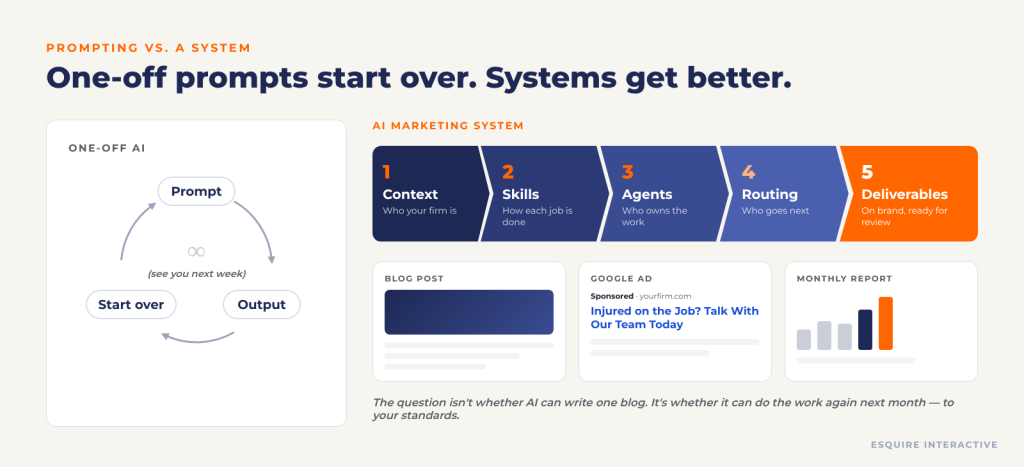
Most legal marketers use AI the same way: open a chat, paste a prompt, fix the output, close the tab. Next week, start over.
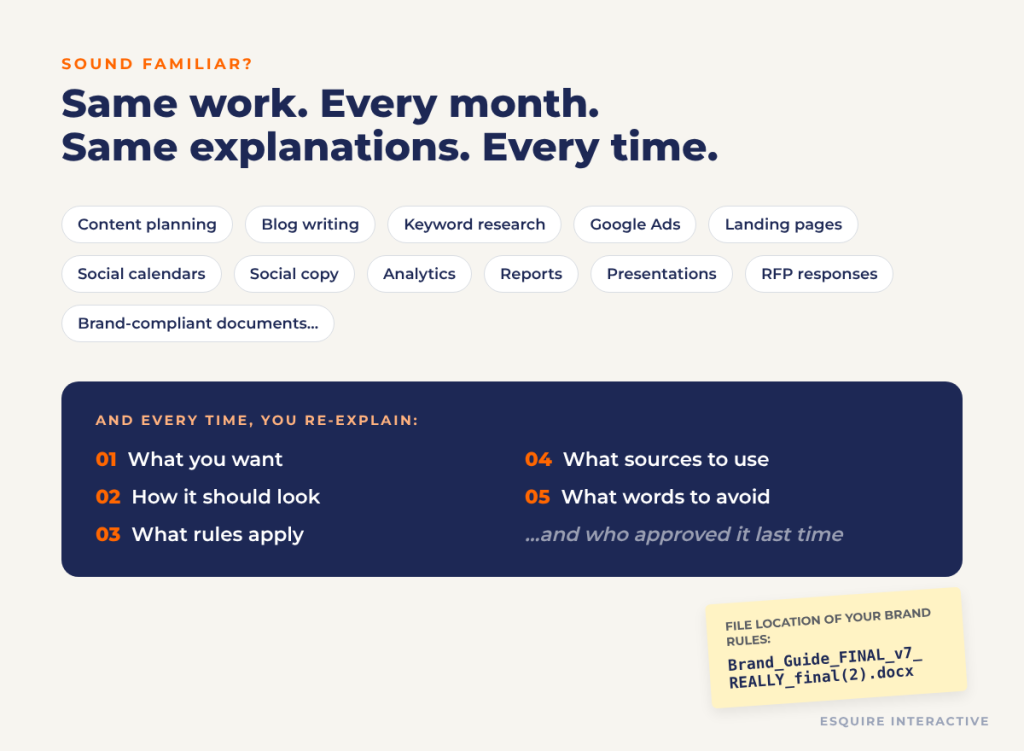
The tasks repeat: content planning, blog writing, keyword research, Google Ads, landing pages, social calendars, reports, presentations. And every time, someone re-explains the same five things:
What you want
How it should look
What rules apply
What sources to use
What terminology to avoid
The problem is not whether AI can write one blog post. It can. The problem is whether it can do the work repeatedly, to your standards, without a senior marketer rewriting half of it. Prompting is not a system. What we build is.
We Build Your AI Marketing Team. Custom. Not Off the Shelf.
Off-the-shelf AI tools are built for every firm, which means they are built for no firm in particular. They do not know your voice, your attorneys, your intake priorities, or the words your state bar will not let you use. You end up doing the customizing yourself, one prompt at a time.
We do that work once, properly, and hand you a finished system. Every engagement is custom-built from your own materials and workflows:
Your context library: brand, voice, attorneys, offices, practice areas, and compliance guardrails, written into files every AI task reads
Your custom skills: playbooks for the marketing jobs your team repeats, built from your best past work and your templates
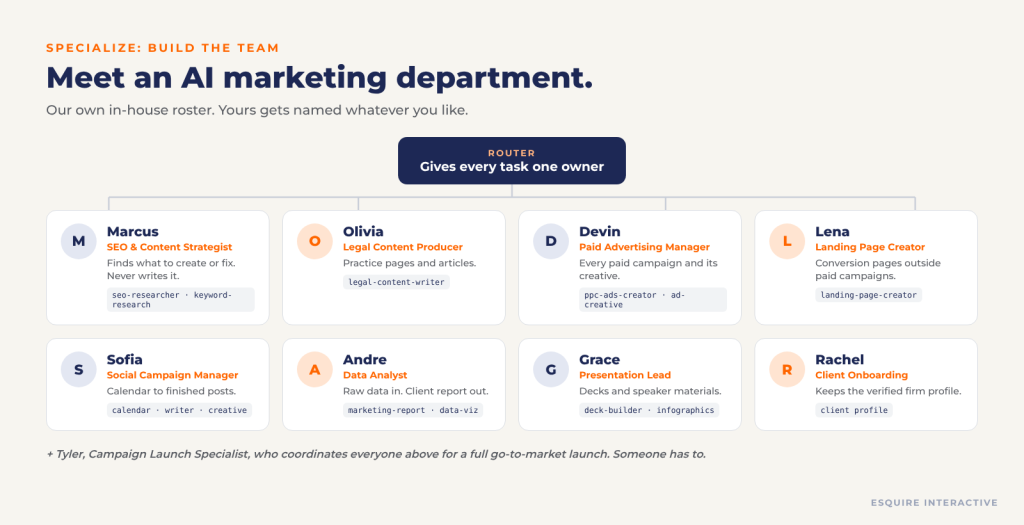
Your custom agents: specialized AI team members with clear roles, ownership, and approval checkpoints
Your connections: Google Analytics, Search Console, Google Ads, Ahrefs, Canva, and the other platforms you already use
Your workspace: organized and installed in Claude, ChatGPT, Gemini, or VS Code, depending on how your team works
Your team, trained: hands-on training and plain-English documentation, so the system keeps working after we hand it off
You tell us the work that eats your week. We build the AI that does the first draft of it, your way.
Five Terms That Make the Rest of This Page Make Sense
Prompt: The assignment. “Write a blog about Arizona dog-bite law.”
Context: What the system should know about your firm before it writes a word: brand, attorneys, practice areas, compliance rules.
Skill: The playbook for doing one job well, written down once and reused every time.
Agent: The specialized team member who knows which playbook to use, in what order, and when to stop and ask a human.
Tools: What an agent actually reaches for: Canva, Google Analytics, Search Console, Ahrefs, Word, PowerPoint.
A quick note on file names: most of this lives in .md (Markdown) files, which are plain text with simple headings and bullet points that both people and AI can read. It looks a little like code. It is mostly organized writing.
Context Files: The Employee Handbook Your AI Actually Reads
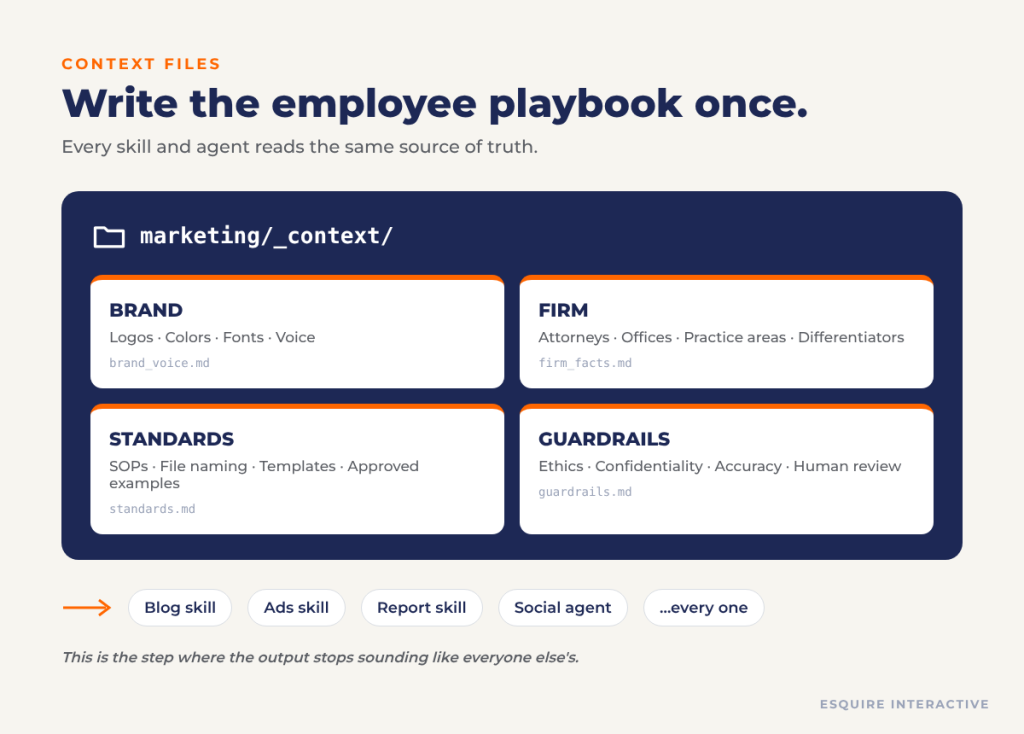
Before you hire an AI employee, write the employee playbook. Context files tell AI who your firm is and how work should be done, once, so every skill and agent reads the same source of truth.
We build four kinds:
Brand: Logos, colors, fonts, and voice
Firm: Attorneys, offices, practice areas, and what sets you apart
Standards: SOPs, file naming, templates, and approved examples of “good”
Guardrails: Ethics, confidentiality, accuracy, and human review requirements
This is the step that makes output stop sounding generic. No existing brand guide? That is common. We start from what you already have (past decks, style guides, approved blogs, ad history, intake scripts) and turn it into a structured context library your team owns.
What we build for you: a custom context library for your firm, typically a set of focused files plus a manifest that tells the AI which file to read for which job.
Skills: Your Best Work, Written Down Once
A skill teaches AI how to perform one specialized task the same way every time. A one-line prompt says “write a blog about Indiana probate.” A skill already knows the jurisdiction rules, the keyword research step, the internal links, the meta tags, the words your firm never uses, the length, the format, and where the finished file goes.
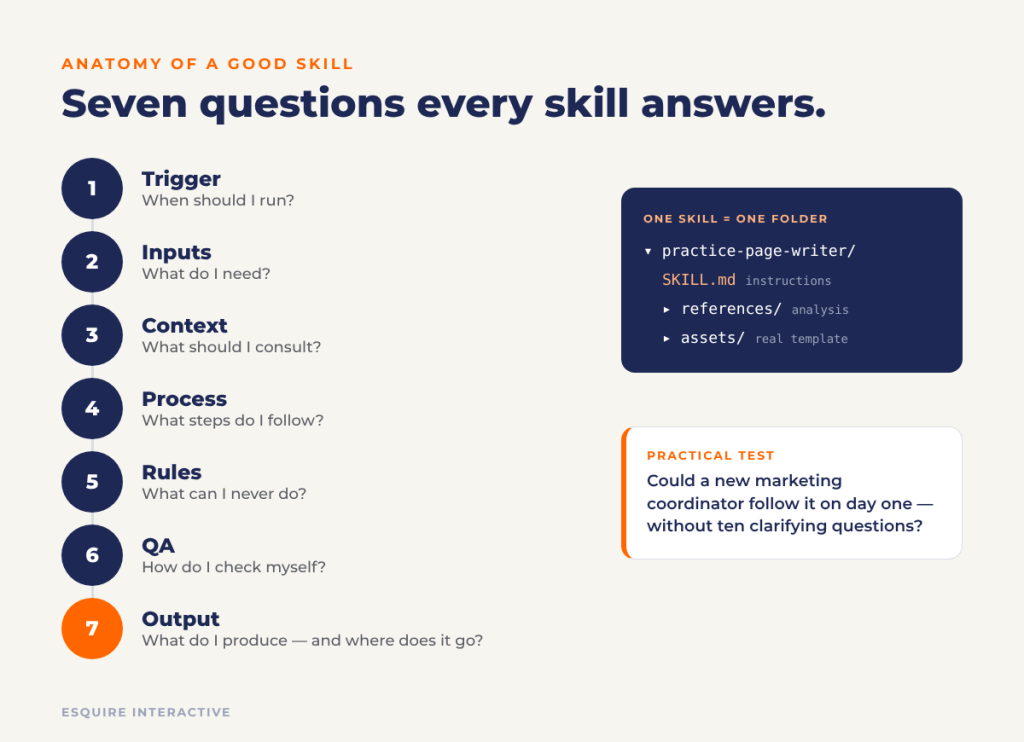
A good skill answers seven questions:
Trigger: When should I run?
Inputs: What do I need?
Context: What should I consult?
Process: What steps do I follow?
Rules: What can I never do?
QA: How do I check myself?
Output: What do I produce, and where does it go?
The practical test: could a new marketing coordinator follow it on day one? If so, AI can too.
Is your task a skill candidate? If you do it regularly, with roughly the same steps, under rules you keep re-explaining, and you have examples of good output, the answer is yes. Common first skills for law firms include practice-area page writing, Google Ads copy with bar-compliance checks, monthly reporting, social calendars, and branded presentation decks.
What we build for you: custom skills for your highest-value repeat work, each tested on your real assignments before handoff. Need something unusual, like RFP responses, attorney bios, CLE decks, intake scripts, or referral newsletters? If your team does it repeatedly, we can build a skill for it.
We do not write skills from a blank page. We use a two-step pattern:
Gather and analyze. Your past decks, posts, reports, or pages go into one folder. AI studies them and produces a detailed written analysis of layouts, fonts, colors, structure, tone, logo rules.
Build, then test. The skill is built on top of that analysis and your real template. We run it on live work, fix what is off in the skill (not just the output), and run it again.
The result is a skill folder with three things: the instructions (SKILL.md), the reference analysis, and the real template it starts from every time.
Proof, not promises: we used this exact process to build our own branded-deck skill, then used that skill to draft our 2026 LMA TW x SW conference presentation on this topic. It cut first-draft build time roughly in half. A person still reviewed every slide.
Agents: Hire Specialists, Not Prompts
kills do one job well. An agent bundles the right skills under a single role, like a hire with a job description. It knows which skills to call, in what order, and when to stop and wait for approval.
We write agent instructions the way you would write a job description, in eight parts:
Mission: What is this agent for?
Triggers: What requests does it pick up?
Owns: What deliverables are its responsibility?
Skills: Which playbooks does it use?
Does not own: What does it hand off? (Just as important.)
Workflow: In what order does it work?
Approval: Where does it stop for a human?
Output: What does it hand back?
Example: a Social Media Campaign agent receives a client and a month. It builds the calendar using keyword and content research, then stops. Nothing gets written or designed until a person approves the calendar. After approval, it drafts the posts, the supporting blogs, and the graphics, and packages the campaign.
No code required. If you can write a clear job description, you can supervise an agent.
What we build for you: custom agents designed around your team’s real roles and approval chain, whether that is one content agent for a solo practice or a full routed department for a multi-office firm.
Routing: One Owner Per Task (Because Agents Have Office Politics Too)
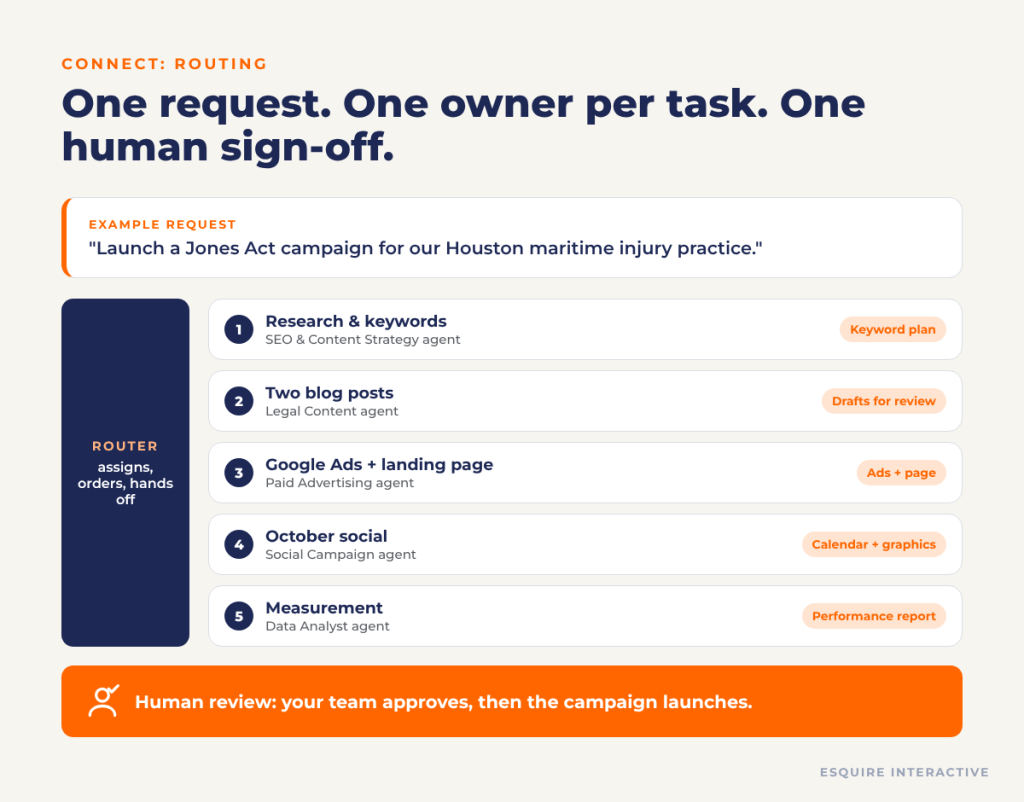
Once you have several agents, something has to decide who does what. That is routing: a coordinator that acts like a project manager. It identifies the tasks in a request, picks the right agent for each, sets the order, passes approved work between them, and assembles the final deliverable.
Without routing, the problems look familiar to anyone who has managed people:
Duplicate work: Two agents start the same assignment. Fix: every task gets exactly one owner.
Endless handoffs: A passes to B, B to C, C back to A. Fix: agents call skills, not other agents.
Research redone: Keyword research and firm facts rebuilt on every job. Fix: approved upstream work is reused.
Lost context: A blog pulled out of its campaign loses the plan behind it. Fix: the active workflow keeps the task.
Example request: “Launch a Jones Act campaign for our Houston maritime injury practice.” The router assigns keyword strategy, two blog posts, Google Ads and a landing page, a month of social posts, and the measurement report, each to one owner, and your team approves before anything launches.
Watch the Team Work: One Prompt In, a Campaign Out
Here is what the system produces from a single plain-English request. We asked our own AI team for “a compelling landing page for Custom AI Skill & Agent Builder Services, with a contact form” and got a designed, responsive page with developer handoff notes. We asked for “a playful but clean Facebook carousel about FirmMetrics” and got a finished, on-brand carousel.
For a full campaign test, one prompt produced a strategy brief, a measurement plan, keyword research, an opportunity report, a social calendar, carousel graphics, paid-campaign copy and creative, a responsive landing page, and blog and practice-page revisions, with every piece clearly marked as a draft for attorney review before launch.
That last part is the point. The team prepares the work. Your people decide what ships.
Your Workspace in VS Code: Optional, But It Makes the System Visible
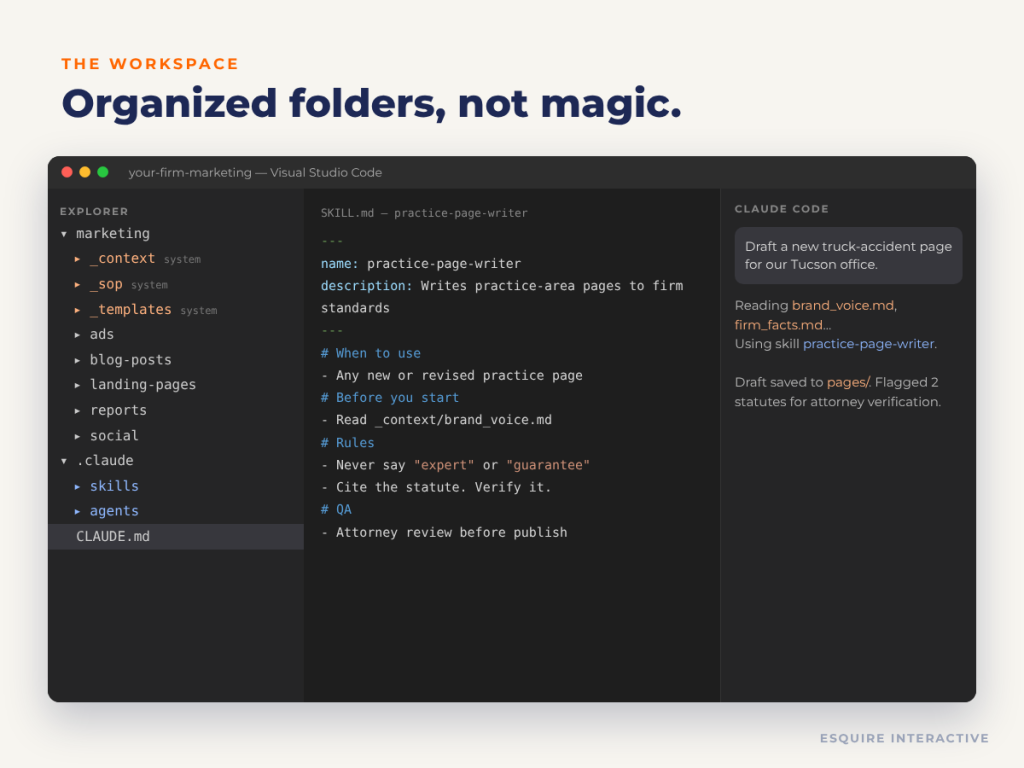
You can start in the chat tool you already use: Claude, ChatGPT, or Gemini. When you want to see the whole system in one place, we set it up in Visual Studio Code, a free editor from Microsoft, with Claude Code running inside it. You talk to it in plain English in a side panel. It reads your files, creates new ones, and runs the steps you ask it to. You do not need development experience.
A typical setup we deliver:
Install VS Code and the Claude Code extension (or your preferred AI platform).
Organize folders like a real marketing department: system folders the AI reads (_context, _sop, _templates) and working folders where deliverables land (ads, pages, reports, social).
Add document tools so AI can produce real Word, Excel, PowerPoint, and PDF files.
Connect your platforms (Google Analytics, Search Console, Google Ads, Ahrefs, Canva, image generation) through secure connectors (Model Context Protocol, or MCP).
Load context, templates, and examples of what “good” looks like.
Build and test your first skills, then your first agent.
Write a master project file that tells the system how everything fits together.
The system starts as organized folders, not magic. That is a feature: you can open any file and see exactly what the AI is being told.
What we build for you: the full workspace, set up and connected, with a master project file and a short walkthrough recording for your team. Prefer to stay in the chat tool you know? We configure the same context and skills there instead.
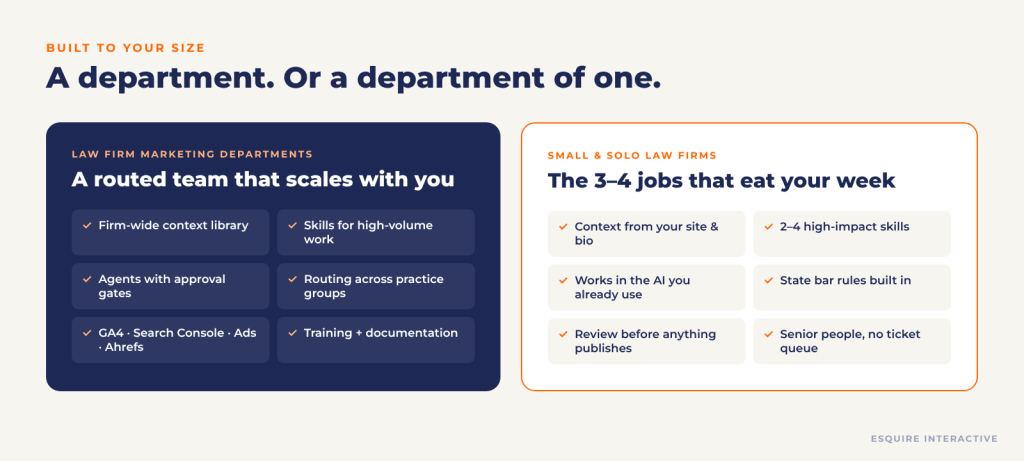
Your team is good. It is also stretched across attorneys, offices, practice groups, and a request queue that never empties. We build a shared AI system your whole department works from:
A firm-wide context library covering brand, attorneys, offices, practice areas, and compliance guardrails
Skills for your highest-volume work: practice pages, blogs, ads, social, decks, reports, proposals and RFP responses
Specialized agents with clear ownership and approval gates
Connected reporting from Google Analytics, Search Console, Google Ads, and Ahrefs
Documentation and training, so the system is your team’s, not a black box we keep the keys to
For Small and Solo Law Firms
You do not have a marketing department. You have you, maybe an assistant, and Saturday mornings. You do not need nine agents. You need the three or four jobs that eat your week done well and in your voice. So that is what we build:
A context library built from your website, bio, reviews, and past content
A few high-impact skills: blog and practice-page writing, social posts, Google Business Profile updates, client newsletters
Set up in the AI tool you already pay for, with or without VS Code
Bar-aware rules built in for your state, plus a review step before anything publishes
You work directly with senior people. No hand-offs, no ticket queue.
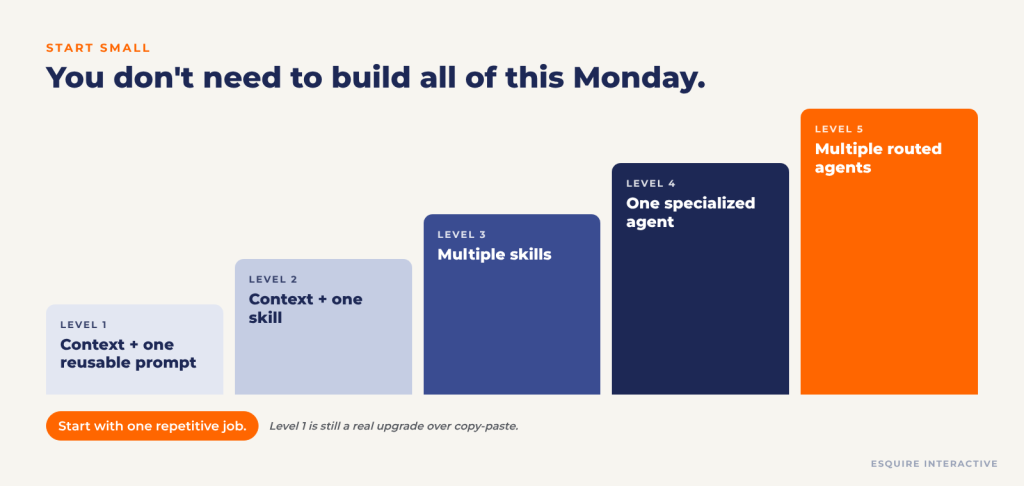
You Do Not Need to Build All of This Monday (We Can Build It in Stages)
Every firm starts at a different level, so every build is scoped to where you are and where you want to be. Here is how we create your custom system:
Map: We audit your recurring marketing work, collect your best examples and templates, and agree on what “good” looks like. You get: a build plan that names the skills and agents worth building first.
Systemize: We write your context library and build your first custom skills from your own materials. You get: working skills, tested on your real assignments.
Specialize: We group skills into agents with clear ownership and approval points. You get: an AI team designed around your roles and sign-off chain.
Connect: We connect your platforms and set up routing so requests reach the right owner. You get: a connected workspace that pulls live data for reporting.
Train and hand off: We train your team, document the system in plain English, and refine based on the first weeks of real use. You get: a system your people run without us, plus support when you want to add to it.
Start with one repetitive job. We will build the next level when you are ready.
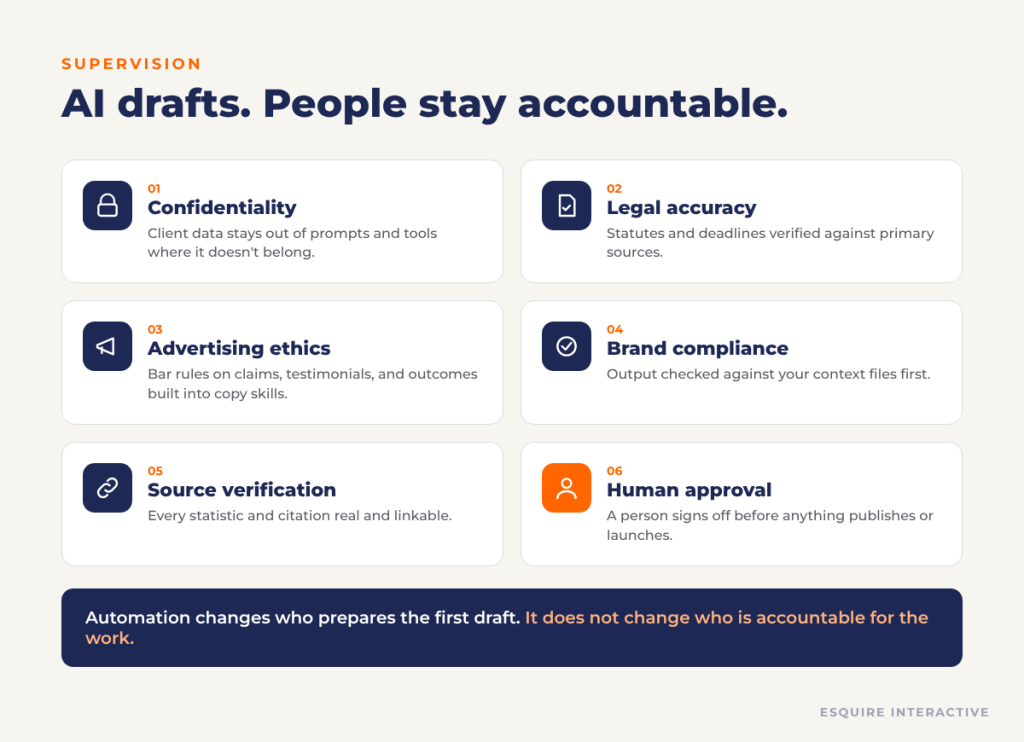
Your AI Team Still Needs Supervision
Automation changes who prepares the first draft. It does not change who is accountable for the work. Every system we build includes six guardrails:
Confidentiality: Client information stays out of tools and prompts where it does not belong.
Legal accuracy: Statutes, deadlines, and procedures are verified against primary sources.
Advertising ethics: Rules on specialization claims, testimonials, and outcome language are built into the skills that write copy.
Brand compliance: Output is checked against your context files before it reaches you.
Source verification: Statistics and citations must be real and linkable.
Human approval: A person approves before anything publishes, sends, or launches.
The ABA addressed lawyers’ use of generative AI in Formal Opinion 512, covering competence, confidentiality, supervision, and fees. Your state bar’s advertising rules still apply to everything AI drafts.
Why Law Firms Build Their AI Marketing Team With Esquire Interactive
We build custom, from your materials. No templates resold under your name. Your context, skills, and agents are built from your firm’s own content, standards, and workflows.
We built ours first. Our own marketing runs on the system described on this page: 16 skills and 9 agents across research, content, paid media, social, reporting, and presentations. You get what works, not a theory.
We know legal marketing. Bar advertising rules, practice-area nuance, and intake realities are built into every skill, not bolted on after.
We teach it. Jeff Lantz and Desire’e Martinelli present this framework to legal marketing audiences, including the 2026 LMA TW x SW Regional Conference.
You own it. Your context files, skills, and agents are plain files in your workspace. No proprietary lock-in.
Frequently Asked Questions About AI Marketing for Law Firms
A skill is a playbook for doing one job well, such as writing a practice-area page to your standards. An agent is a specialist that owns a whole workflow: it decides which skills to use, in what order, and when to stop for human approval. Skills are capabilities; agents are the team members who use them.
We build it for you. Esquire Interactive designs, builds, tests, and installs your custom context library, skills, and agents, then trains your team to use and maintain them. If your team wants to build future skills in-house, we can include hands-on coaching in the engagement.
Most AI tools for lawyers are built for a broad market and focus on legal work such as research or drafting. A custom AI marketing system is built for one firm’s marketing: it is trained on your brand, voice, attorneys, practice areas, and state advertising rules, produces the specific marketing deliverables your team needs, and runs in the AI platform you choose. You own the files, so you are not locked into a single vendor.
Context files are plain-text documents that describe your firm: brand, voice, attorneys, practice areas, standards, and compliance rules. Every skill and agent reads them, so you stop re-explaining your firm in every prompt and the output stops sounding generic.
No. VS Code is optional. It is useful because it shows the whole system (folders, context files, skills, and agents) in one place, but you can start in Claude, ChatGPT, or Gemini directly. Neither option requires development experience; you work in plain English.
We build most systems on Claude, using Claude Code and Agent Skills, because of how well it handles files, skills, and connected tools. We can also set up context and reusable workflows in ChatGPT or Gemini if that is what your firm already uses.
Yes, at the right scale. Most small and solo firms start with a context library and two to four skills for the work that takes the most time. You do not need agents or routing to see the benefit.
Marketing systems are built to work from public and firm-approved information, not client files. We configure guardrails about what can be shared with AI tools, review the data-handling terms of the platforms you use, and keep a human approval step before anything is published. We recommend firms review ABA Formal Opinion 512 and their state bar’s guidance.
No. It changes what your team spends time on. AI prepares first drafts and handles repeatable production; your people set strategy, review, approve, and handle the judgment calls that require knowing your firm and your clients.
It depends on scope. A context library and first skill can come together quickly; a routed, multi-agent department takes longer and is usually built in phases. We scope timing after an initial assessment.
Pricing depends on the number of custom skills and agents, the platforms we connect, and how much training your team needs. We provide a fixed scope and quote after an initial assessment, and many firms start with a context library and one or two skills.
Tell Us What You Want Built
Whether you lead a marketing department or are the marketing department, bring us the work that repeats every month. We will show you what a custom AI system for your firm would look like. Then we will build it.